

- Admin
- #1

- Joined
- May 21, 2021
- Messages
- 2,789
- Reaction score
- 1,662
- Points
- 113
- Location
- Stuart, Florida
- Website
- themikephillipsforum.com
How to change between Light and Dark Theme and Stretch or Shrink the Width of forum
When you're on this forum, you can switch or toggle between the Light or Dark themes. When you're on a computer, look for the Light Bulb and click on it.
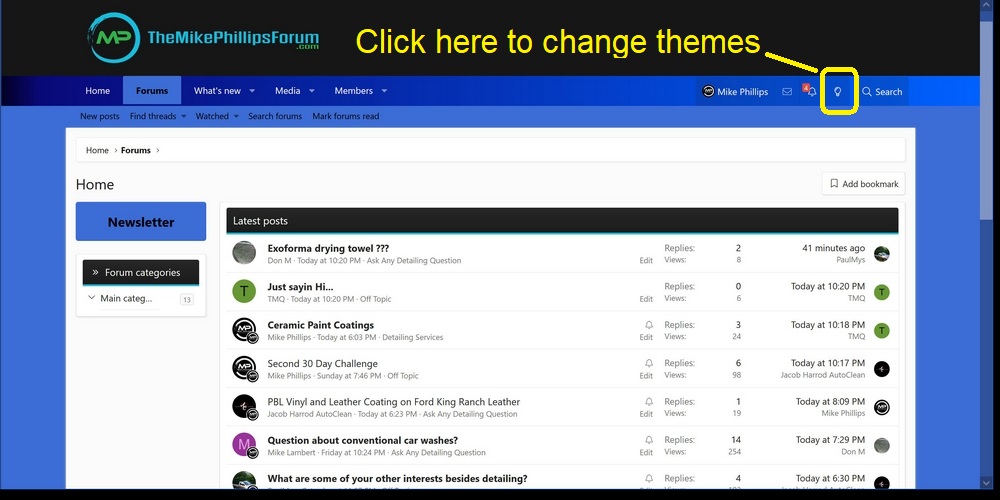
There is also the option to choose the Light or Dark theme on the bottom right hand side of the forum. Click either the Style Chooser or Change Style.
And to expand the forum to full width or narrow width - click on the text Change Width.

When you're on this forum, you can switch or toggle between the Light or Dark themes. When you're on a computer, look for the Light Bulb and click on it.
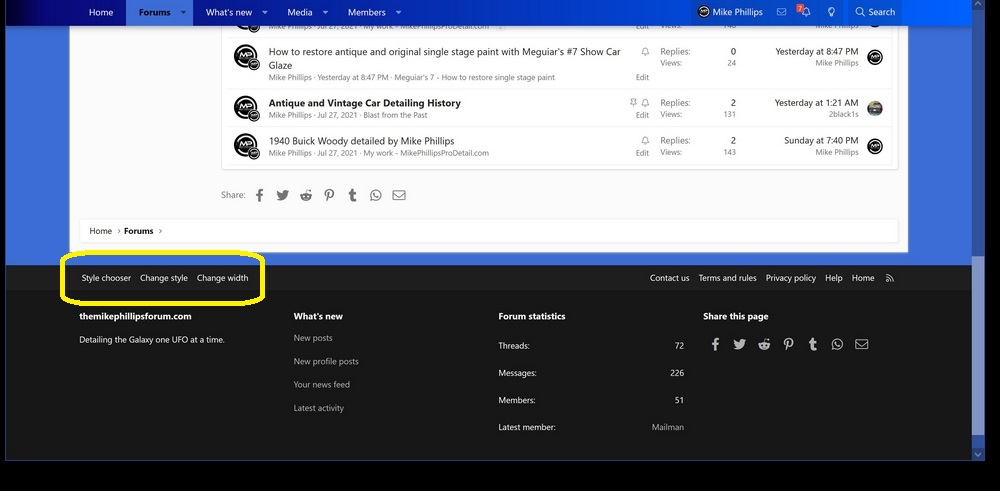
There is also the option to choose the Light or Dark theme on the bottom right hand side of the forum. Click either the Style Chooser or Change Style.
And to expand the forum to full width or narrow width - click on the text Change Width.
Last edited: